
People
How someone likes to work, what they asked for before, what causes friction.
Local memory graph for AI assistants
Every project has conventions you have explained a dozen times — the library they will not drop, the deploy step nobody documented, the refactor you already tried and abandoned in March. SYNAPSSE keeps it on your machine, and every assistant you open already knows it.
// why
You brief it. It does good work. You close the tab and the briefing is gone. The cost is not the retyping — it is the times you do not bother, and it rebuilds the thing you already decided against.
It looks up a short list
Titles and one-line summaries — just enough to pick the right one.
step 1It opens the one that matters
The decision, why it was made, and what it depends on — about a page, not a whole conversation.
step 2It follows the connections
Whatever that memory is linked to — a person, a project, the problem behind it. It stops as soon as it can answer.
step 3None of it leaves your computer
The part that understands your notes runs on your own processor. It all lives in one file you can copy to back up.
0 sentYou have already explained this. Twice.
// see it
A real memory graph, right here. Hover a circle to light up what it is connected to, click to read it, or press the button and watch it find the link between two memories on its own.
// inside the app
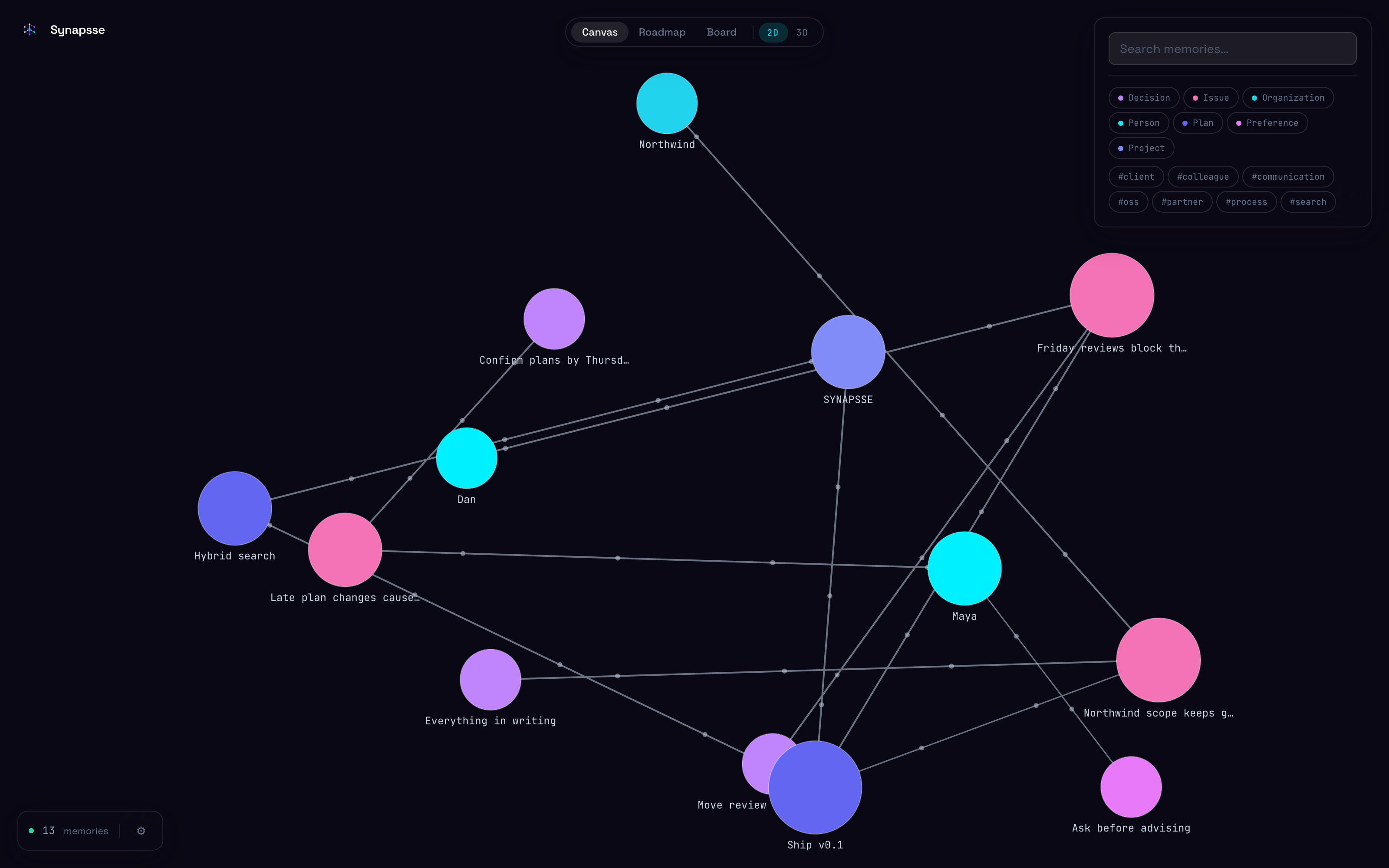
// the canvas
Colour is the kind of thing. Size is how connected it is. Drag one and it stays where you put it.
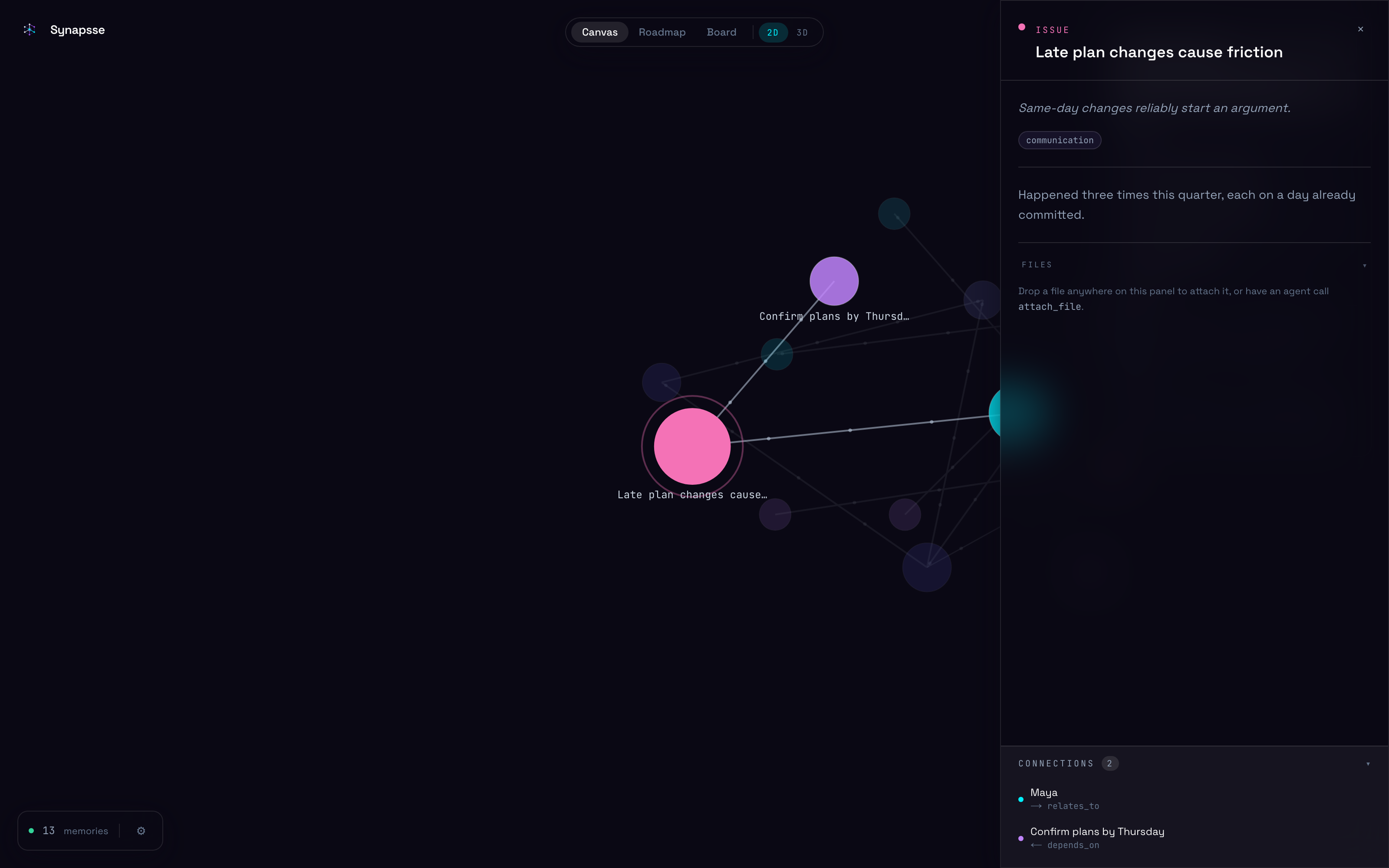
// one memory
Its notes, its tags, and everything it links to — one click from the thing behind it.
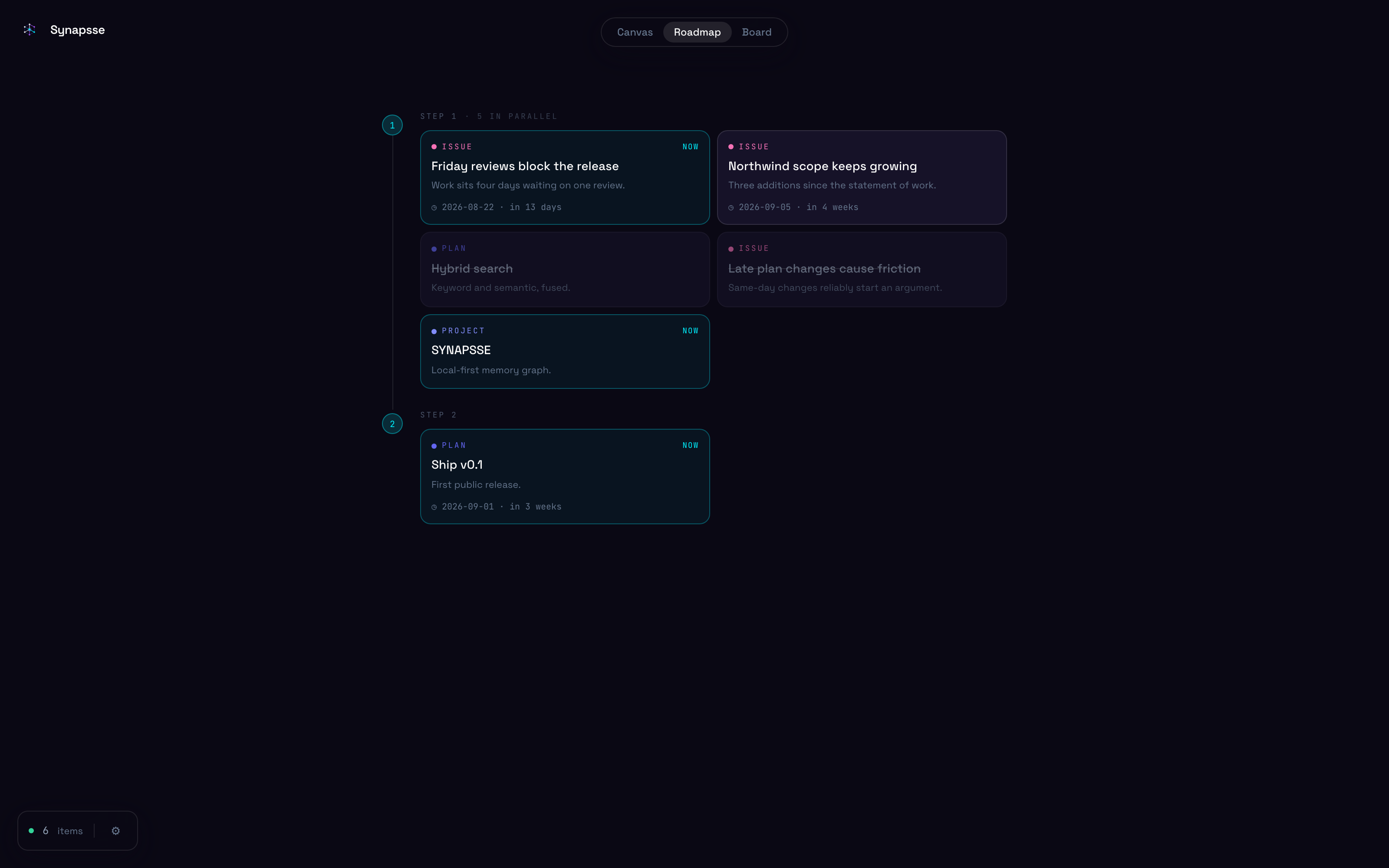
// your plans
Anything with a status becomes work. The order comes from links the memories already had.
// what it keeps
The handful of things that stay true and cost you something to work out twice.
How someone likes to work, what they asked for before, what causes friction.
What is planned, what is waiting on what, and what already shipped.
What you chose and why, so it does not get argued again.
What went wrong and what fixed it — linked, so the fix is one step away.
What binds you — the client who approves in writing only, the box nobody touches on a Friday.
What you already tried, and why it did not work — the most expensive thing to learn twice.
You never have to say “remember this”, and you never have to say “look it up”. Assistants write things down as they work, and a hook hands them what is relevant before they answer you.
// who it's for
This pays off in proportion to how many separate worlds you keep in your head at once — and how expensive it is to get one of them wrong.
Contract & freelance
One runs migrations by hand. One will not take a dependency added after 2021. One has a staging box you must never touch on Fridays.
Open any of their repos and the assistant already knows which is which.
Engineering
Why the queue is there. What was tried first. Which constraint killed the obvious fix, eighteen months before you arrived.
Decisions carry their reasoning, and agents read it before touching anything.
Solo founders
Pricing you set for a reason you have forgotten. A customer who churned over one thing. The integration you shelved twice.
Ask why the price is what it is and get the argument back, not a guess.
Research & side projects
Dead ends are the most expensive thing to rediscover and the least likely to be written down anywhere.
What failed is a memory too, linked to the problem it failed at.
Straight about the limits: one machine, one person. No sync, no sharing, no accounts — which is why it suits work under NDA, and why it is not a team tool today. If what you need is one memory several people write to, this is not it yet.
// install
Everything below runs from inside that folder.
Download the ZIP, unpack it, and open a terminal in the folder.
Or install git first — macOS: xcode-select --install · Linux: sudo apt install git · Windows: winget install Git.Git
One command starts everything, in the background.
macOS — brew install --cask docker, then open it once.
Linux — curl -fsSL https://get.docker.com | sh
Windows — winget install Docker.DockerDesktop
Or download it from docker.com. Would rather not install it at all? Use the tab beside this one.
Two processes, two terminals.
Daemon on :8000, canvas on :3000. Both come
back whenever Docker does — on macOS and Windows that means letting
Docker Desktop start at login. The first start fetches the embedding
model once; keyword search answers immediately while it does — swap
up for logs -f to watch it, and for
down to stop them.
One command, from anywhere.
Or commit the same server to a project in .mcp.json.
Or just say it
Paste this instead and it does all of the above itself, plus both hooks.
Add to ~/.cursor/mcp.json.
Or .cursor/mcp.json to keep it to one project.
Or just say it
Paste this instead and it does all of the above itself, plus the recall hook.
Add to ~/.gemini/settings.json.
The key is httpUrl — that is what Gemini CLI uses for streamable HTTP.
Or just say it
Paste this instead and it does all of the above itself, plus the recall hook.
Add to ~/.gemini/config/mcp_config.json.
In the IDE: Manage MCP Servers → View raw config. The key is serverUrl.
Or just say it
Paste this instead and it does all of the above itself, plus the recall hook.
Any client that speaks MCP. Point it at http://localhost:8000/mcp over streamable HTTP, in whichever file it keeps its servers in.
Or just say it
Paste this instead and it does all of the above itself, plus the recall hook.
Optional, and the step that changes how the whole thing feels. Writing happens on its own; reading is left to the assistant noticing it should look — and it cannot notice what it does not know. This hook searches your memory with every message you send and hands the results over before the assistant answers.
In Claude Code, register that as a UserPromptSubmit
hook in ~/.claude/settings.json — the
README
has the block to paste — add it beside any hooks you already
have rather than replacing them, then open /hooks
once so the settings are re-read. Adds about 130ms to a message,
needs nothing installed, and stays silent if the daemon is not
running.
You will know it worked when an assistant answers using something you told it days ago, without you mentioning it and without it looking anything up.
You never have to say “remember this”. Every assistant that connects is told to write things down as it goes — preferences, decisions and their reasons, people, problems and what fixed them — and with the hook in place, to arrive already knowing them.
// private by design
The part that understands your notes runs on your own processor. Nothing you write is ever uploaded.
No account, no sign-up, no tracking. Your memory is one file on your disk, and you can delete it whenever you like.
Links your assistant saves are never opened in the background, so reading a memory tells nobody that you did.
// questions
No. The part that understands your notes runs on your own processor. There is no server to send anything to.
Any that speak MCP — Claude Code, Cursor, Gemini CLI, Antigravity, and most others. They all read and write the same memory.
No. Assistants are told to write things down as they work, and to look here before asking you something you have already answered.
Both halves matter, and they fail differently. Writing works well on its own — assistants are told to record as they go, and they do.
Reading is the weak half: an assistant only searches when it occurs to it to search, and the moments it would help most are the ones where it does not know there is anything to look for. That is why step 4 of the install is a hook. It searches your memory with every message you send, whether or not the assistant thought to, and passes the results across before it answers. Without it you have a good store that is read sometimes; with it you have one that is read every time.
One file on your disk, plus a folder for anything you attach. Copy it to back it up, delete it to be rid of it.
Yes, over a private network — but do not simply open the port. The daemon has no password today, so anything that can reach it can read and rewrite your whole memory.
The safe way is a private mesh like Tailscale: install it on the spare machine and on your laptop, and the memory becomes reachable at that machine's private address, visible only to your own devices. An SSH tunnel does the same job with no extra software.
Not yet. It runs for one person on one machine — which is why it suits confidential work, and why it is not a team tool today.
Nothing. It is MIT licensed and it runs on your own machine, so there is no subscription, no account and no server bill to pass on. Use it at work, ship it inside something you sell, fork it.